Loading...
Best 4K Camera Drone 2026 — Picks Worth Recommending
December 19, 2025The best camera drones deliver aerial footage that's actually worth watching — sharp resolution, stable video, and enough smart features to get the shot without a professional pilot's skill level. We compare top camera drone picks on image quality, flight stability, obstacle handling, and value.
As an Amazon Associate I earn from qualifying purchases at no cost to you – it keeps the site running.
As an Amazon Associate I earn from qualifying purchases at no cost to you – it keeps the site running.
MSMV 4K Drone with Camera
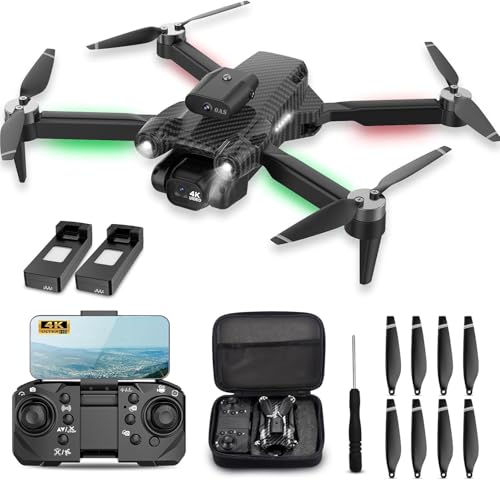
Overview: MSMV's 4K drone leads this comparison on resolution — 4K footage and photo capture with emergency stop functionality, headless mode, and a carrying case included. The emergency stop button immediately cuts all motors on command, a safety feature that prevents uncontrolled flights from becoming property damage situations. The included carrying case is a practical addition that protects the drone between flights and simplifies transport.
4K resolution is the headline capability: at four times the pixel density of 1080P, 4K footage captures significantly more detail in scenic and aerial photography — architectural details, landscape textures, and subject detail that 1080P footage compresses away. For users who want to crop, zoom, or review footage on larger screens, the 4K resolution headroom is practically useful. The emergency stop is a safety differentiator: rather than fighting for control of a malfunctioning or panicked drone, a single button press cuts all motors immediately — the drone drops, but the flight ends on your terms rather than the drone's.
Headless mode removes the orientation challenge that most beginners struggle with: in standard mode, forward is always relative to the drone's nose direction, which changes as the drone rotates. In headless mode, forward is always away from the pilot regardless of where the drone is pointed — dramatically simplifying control inputs for new flyers. 360° flips provide the standard trick capability; two batteries extend total flight time; the carrying case protects the drone during storage and transport. The package is well-suited for buyers who want 4K footage capability in a beginner-accessible package without managing the full complexity of professional drone systems.
Pros
4K resolution – four times the detail of 1080P for aerial photography and video
Emergency stop button – immediate motor cutoff for safety in uncontrolled flight situations
Carrying case included – protection and transport convenience out of box
Headless mode – orientation-independent control for beginners
2 batteries included – extended total flight time
360° flips – accessible aerial trick
Cons
MSMV is a newer brand with limited established reliability history
No brushless motor – brushed design vs. TODAMU's brushless in this comparison
No obstacle avoidance vs. TODAMU's sensor suite
Best for Buyers who want 4K aerial footage with emergency stop safety and a carrying case in a beginner-accessible package, without paying for brushless motors or obstacle avoidance.
TODAMU Brushless FPV Drone with EIS Camera
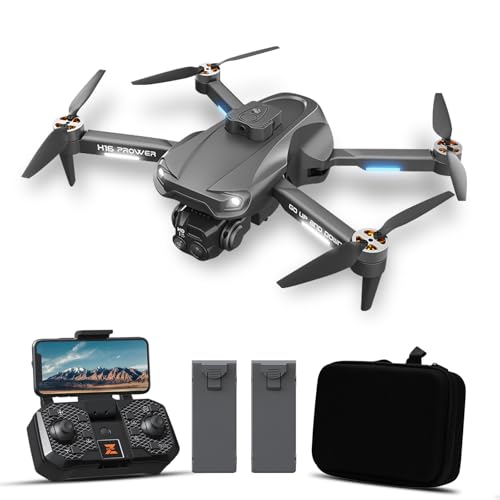
Overview: TODAMU differentiates with Electronic Image Stabilization (EIS), obstacle avoidance sensors, and a brushless motor in the beginner camera drone segment — a combination that addresses the two most common footage quality problems (camera shake) and the most common crash cause (collisions) simultaneously. For buyers who want smooth, usable aerial footage without professional drone complexity, TODAMU's EIS and obstacle avoidance deliver results that standard camera drones at this tier don't.
EIS (Electronic Image Stabilization) post-processes the camera feed to remove the vibration and micro-shake that makes budget drone footage look jittery. Unlike mechanical gimbal stabilization (used in professional drones), EIS works in software — cropping the frame slightly to provide a stabilized output. The result is footage that looks intentional rather than accidental, which is the difference between footage you share and footage you delete. For a beginner drone that will experience imperfect flight conditions, EIS converts shaky reality into watchable video.
Obstacle avoidance uses front-facing sensors to detect objects in the flight path and either stop or navigate around them — significantly reducing the collision crashes that end most beginner drone sessions prematurely. Combined with stable hover, the TODAMU provides a more forgiving flying environment than non-avoidance alternatives. The brushless motor is quieter and more durable than brushed motors at this tier. Gesture selfie enables hands-free photo/video capture by posing in front of the camera — the drone recognizes the gesture and takes the shot without controller input. Headless mode simplifies orientation control for beginners; two batteries extend total flight time.
Pros
EIS camera stabilization – removes video shake for smooth, shareable footage
Obstacle avoidance – front-facing sensors reduce collision crashes for beginners
Brushless motor – quieter, more durable than brushed alternatives at this tier
Gesture selfie – hands-free photo/video capture without controller input
Stable hover + headless mode – beginner-friendly flight control
2 batteries included
Cons
TODAMU is a newer brand with limited multi-year review history
EIS involves slight frame crop – minor reduction in field of view vs. non-stabilized footage
Obstacle avoidance is front-facing only – side and rear collisions are not covered
Best for Buyers who prioritize smooth footage quality and collision protection over maximum resolution — EIS and obstacle avoidance together deliver a more forgiving and rewarding first camera drone experience.
Dazlen Foldable Drone with 1080P Camera

Overview: Dazlen's foldable drone combines stable hover, waypoint fly, and 1080P camera in a compact package for adults and beginners who want reliable footage without advanced features. The waypoint fly functionality — draw a path on the app screen and the drone follows it autonomously — is a practical creative tool for capturing planned shots that manual flying can't replicate consistently. 3D flips, one-key start, and indoor/outdoor versatility round out a straightforward, capable beginner package.
Waypoint fly transforms drone photography from reactive (capturing whatever the drone happens to be pointing at) to planned (setting a precise flight path for repeatable, intentional shots). Draw the desired route on the app, set the altitude, and the drone executes the path autonomously while the pilot focuses on the camera — a workflow that produces more controlled footage than manual flight alone. For outdoor photography of specific routes, property perimeters, or scenic paths, waypoint fly is a genuine creative tool rather than a gimmick.
Stable hover holds altitude and position without constant stick input, reducing the cognitive load for beginners who are already managing multiple inputs simultaneously. The foldable design compresses the drone to a fraction of its flying footprint, making it practical to carry in a bag for opportunistic outdoor flights. 1080P camera covers the standard aerial footage use case; 3D flips provide the trick capability most new pilots want to try early. One-key start removes the manual arm-and-throttle sequence that intimidates first-time flyers. The indoor and outdoor versatility expands the use context beyond fair-weather-only alternatives.
Pros
Waypoint fly – autonomous path-following for planned, repeatable aerial shots
Stable hover – altitude and position hold reduces active pilot workload
Foldable design – compact for transport and storage
Indoor and outdoor versatile – not limited to outdoor fair-weather flying
One-key start – removes manual arming complexity for beginners
2 batteries included
Cons
1080P camera – lower resolution than MSMV's 4K in this comparison
No EIS or obstacle avoidance vs. TODAMU
Dazlen is a newer brand with limited established review history
Best for Beginners and adults who want waypoint fly for planned aerial photography alongside stable hover and a compact foldable design — straightforward and capable without advanced features adding complexity.
HISINGY Firefly EX Mini Drone

Overview: HISINGY Firefly EX is a micro/nano indoor RC drone targeting kids aged 10–15 — built for indoor agility rather than outdoor aerial photography. Three selectable speeds, altitude hold, 360° flip, and headless mode cover the core skill-building features in a tiny form factor that minimizes damage risk during the learning crashes that every new pilot experiences. For indoor drone flying as a skill sport rather than a camera platform, the Firefly EX is purpose-built.
The micro/nano form factor is both the Firefly EX's primary feature and its primary constraint. Small size means low kinetic energy at impact — crashes into walls, furniture, and people result in minor bounces rather than property damage, making indoor flying genuinely safe for the 10–15 age range. The trade-off is that the tiny frame has limited wind resistance, making outdoor flying in anything beyond dead-calm conditions impractical. For dedicated indoor flying, the small size is the right design decision.
Three speed settings provide meaningful skill progression: low speed gives beginners time to react and correct; medium speed introduces responsive handling; high speed challenges experienced pilots with fast, precise control inputs. Altitude hold removes the throttle management burden, letting pilots focus on directional control during the learning phase. 360° flip is the gateway trick that motivates new pilots to keep flying. Headless mode removes orientation complexity during early flights. Long flight time relative to the drone's size reflects the efficiency of the small brushless-capable frame and lower power consumption. The Firefly EX is the right choice specifically for indoor drone flying as a hobby — not for outdoor photography or FPV exploration.
Pros
Micro/nano form factor – low crash damage risk indoors, safe for 10–15 age range
3 speed settings – meaningful skill progression from beginner to advanced
Altitude hold – automatic height maintenance reduces learning curve
Long flight time – efficient small frame extends flying sessions
360° flip + headless mode – engaging tricks and simplified orientation control
HISINGY established in the mini drone segment
Cons
No camera – pure flight experience, no aerial photography capability
Indoor/calm-weather only – tiny frame has very limited wind resistance
Not suitable for outdoor aerial photography use cases
Best for Kids aged 10–15 who want indoor drone flying as a skill sport — the micro form factor makes it genuinely safe to fly inside, and three speed settings provide a clear progression path from beginner to confident pilot.
Loading comments...